
Creating an ADMIXTURE calculator involves several steps, including data preparation, quality control, and running the ADMIXTURE software. Below is a detailed tutorial on how to prepare your data and perform the necessary preanalysis steps using PLINK, leading up to running ADMIXTURE. For this tutorial, we assume you have a BED file named Populations.bed.
Step 1: Install Required Software
Ensure you have PLINK and ADMIXTURE installed on your system. You can download them from the following links:
- PLINK: PLINK Download
- ADMIXTURE: ADMIXTURE Download
Step 2: Preanalysis Stage in PLINK
2.1 Convert BED File to PLINK Format
First, convert your .bed file into PLINK's binary format if it is not already in that format.
plink --bfile Populations --make-bed --out Populations
2.2 Quality Control
Perform quality control to filter out low-quality data. This includes removing individuals or SNPs with a high proportion of missing data, minor allele frequency filtering, and Hardy-Weinberg equilibrium filtering.
- Remove SNPs with high missing rate (e.g., >10% missing):
plink --bfile Populations --geno 0.1 --make-bed --out Populations_filtered1 - Remove individuals with high missing rate (e.g., >10% missing):
plink --bfile Populations_filtered1 --mind 0.1 --make-bed --out Populations_filtered2 - Filter by Minor Allele Frequency (MAF) (e.g., MAF < 0.05):
plink --bfile Populations_filtered2 --maf 0.05 --make-bed --out Populations_filtered3 - Hardy-Weinberg Equilibrium (HWE) filtering (e.g., p-value < 0.0001):
plink --bfile Populations_filtered3 --hwe 0.0001 --make-bed --out Populations_filtered4
2.3 Linkage Disequilibrium (LD) Pruning
To reduce the effects of linked markers, perform LD pruning.
plink --bfile Populations_filtered4 --indep-pairwise 50 5 0.2 --out Populations_pruned
This command creates two files:Populations_pruned.prune.in and Populations_pruned.prune.out. The .prune.in file contains the SNPs that are in approximate linkage equilibrium.
2.4 Create Final Pruned Dataset
Use the pruned SNPs to create the final dataset for ADMIXTURE.
plink --bfile Populations_filtered4 --extract Populations_pruned.prune.in --make-bed --out Populations_final
Step 3: Running ADMIXTURE
Now that you have the pruned and filtered dataset, you can run ADMIXTURE. ADMIXTURE requires the dataset in PLINK binary format (.bed, .bim, .fam).
- Run ADMIXTURE with a specified number of ancestral populations (K). For example, to run ADMIXTURE with K=3:
admixture Populations_final.bed 3ADMIXTURE will produce several output files:Populations_final.3.Q: Ancestry proportions for each individual.Populations_final.3.P: Allele frequencies for each population.
- Evaluate the results:
- Open the
.Qfile to see the ancestry proportions for each individual. - Open the
.Pfile to see the allele frequencies for each ancestral population.
- Open the
Step 4. Create The Admixture Studio Configuration File
Prepare the test.alleles File:
Generate a frequency file using PLINK.
plink --bfile final_data --freq --out test
Process the frequency file to create test.alleles using awk and sort.
awk 'NR > 1 {print $2, $5, $4}' test.frq | sort -k1,1 > test.alleles
Prepare the test.txt File:
Create a file test.txt with names for the 3 ancestral populations.
echo -e "Population1\nPopulation2\nPopulation3" > test.txt
Prepare the test.par File:
Create a parameter file test.par with the following content:
echo -e "1d-7\n7\ngenotype.txt\n123456\ntest.txt\nPopulations_final.3.P\ntest.alleles\nverbose\ngenomewide" > test.par
Step 5: Test in Admixture Studio
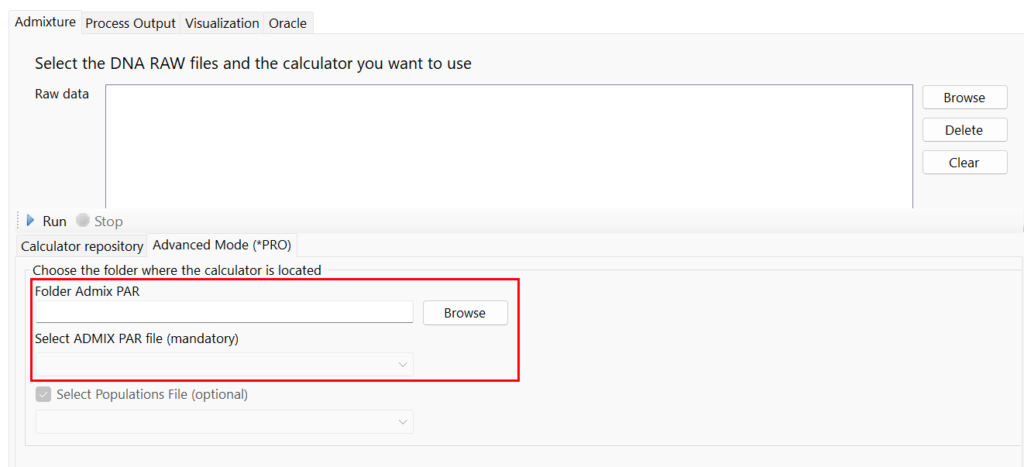
Once you have created your Admixture calculator, you can test it in Admixture Studio using the following tool:
Step 6: Publish it in DNAGENICS
If you want to publish your calculator in our Admixture Studio platform, please contact us at support@dnagenics.com, and we will help you to publish your calculator.