DNA Kit Studio
Convert, clean, and explore your DNA RAW files — locally on your PC.
Your DNA file shouldn't be trapped in one format. DNA Kit Studio helps you convert between common RAW formats and inspect your data with a simple, offline-friendly workflow.
Free download — Windows 7+ — No registration required
Works with the DNA files you already have
Convert and inspect raw DNA data from major Direct-To-Consumer testing companies.
A practical toolkit for hobby DNA workflows
Conversion, inspection, and utilities that map to real-world genealogy and hobby analysis needs.
Data conversion
Move your DNA between formats to unlock more tools and compatibility.
- Multi-format RAW conversion
- Format compatibility
- Batch-friendly workflow
Explore & analyze
Inspect your RAW file and run common checks before using it elsewhere.
- RAW Explorer
- RAW Analyzer
- Segment analysis utilities
Advanced utilities
Tools often used in broader DNA workflows — made easier to run locally.
- RAW Merger
- Chromosome extract
- Data manipulation
From download to conversion in minutes
No installers, no accounts — just a simple ZIP workflow.
Download
Get the ZIP package and keep it in a known folder.
Extract
Unzip the file — everything you need is inside.
Run
Launch DnaKitStudio.exe and start converting or exploring your RAW file.
Application Interface
A simple desktop UI designed for practical, repeatable workflows.
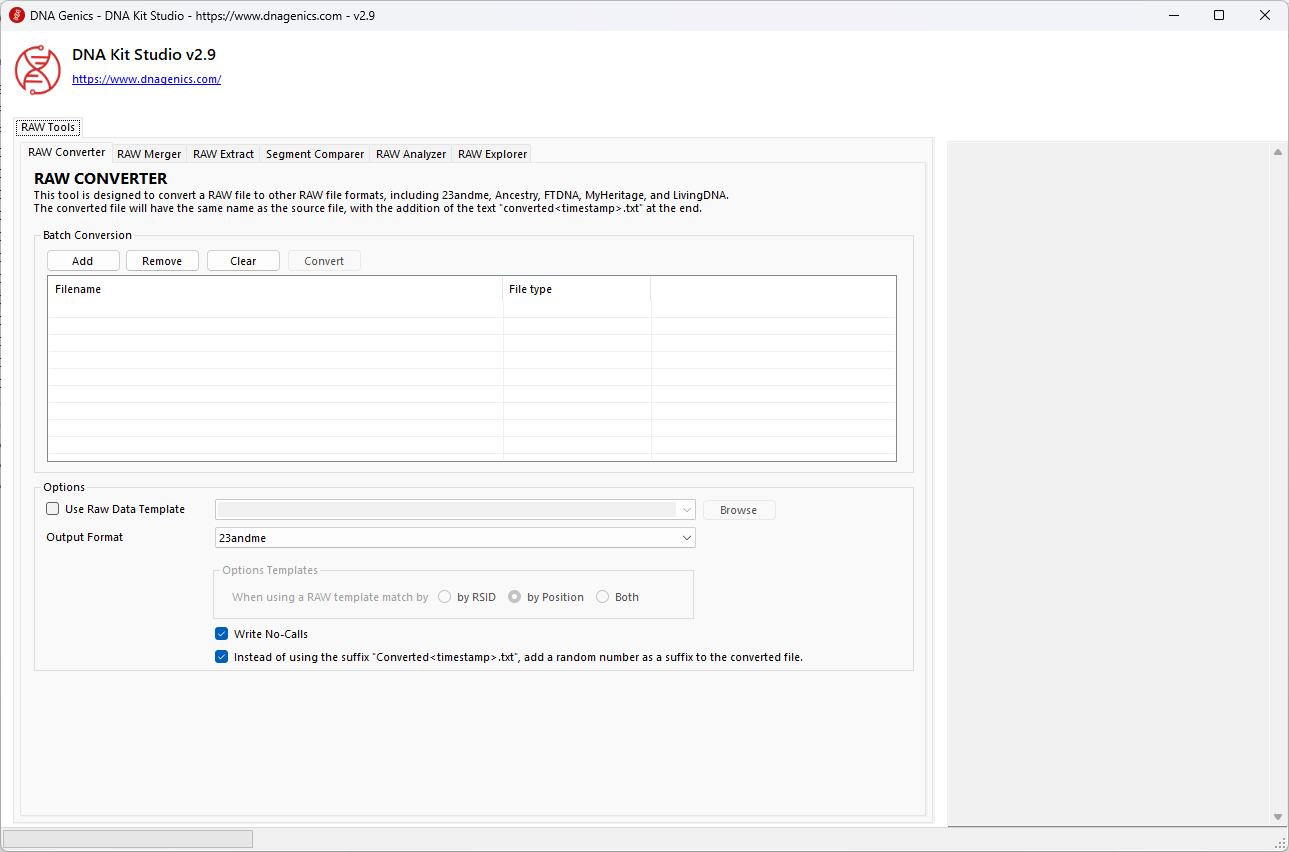
Screenshot of DNA Kit Studio main window.
Privacy-first, offline-friendly
Your DNA data stays on your computer. Always keep backups and verify outputs.
Local processing
DNA Kit Studio does not upload your RAW file. Conversions and analysis run locally.
- No server uploads
- Offline-friendly workflow
- You control your files
Beta disclaimer
This application is still in beta. There may be errors. Always keep backups of your original DNA files.
- Backup originals
- Validate results
- Use responsibly
Take your DNA file work anywhere
DNA Kit Studio is available on Android - convert, extract, and explore RAW DNA files directly on your device, with no uploads.
The same RAW DNA file utilities you rely on, now available on your Android device. Import files directly, run conversions and analysis locally, and explore your SNP data without sending anything to a server.
- On-device processing: your RAW DNA file is never uploaded to a server
- Convert RAW DNA files between supported formats
- Explore SNP records by chromosome, position, rsID, and genotype
- Analyze RAW DNA files with clear summary statistics
- Supports TXT, CSV, TSV, RAW, ZIP, and GZIP input formats
 Free download. Processing runs locally on your device.
DNA Kit Studio for Android is a file utility for personal data management. It is not a medical or diagnostic tool and does not provide health advice, disease risk prediction, or clinical interpretation.
Ready to start?
Download DNA Kit Studio and begin converting and exploring your DNA RAW data today.
Free download — No registration required — Windows compatible
FAQs
DNA Kit Studio is a free Windows application to convert, inspect, and work with raw DNA files from major testing companies. It helps you make your raw data more compatible for different workflows.
DNA Kit Studio supports 23andMe, AncestryDNA, FTDNA, MyHeritage, LivingDNA, Geno and many more. If you can download a raw DNA text file, you can usually work with it here.
No. DNA Kit Studio processes your files locally on your computer. Your raw DNA data is not uploaded to any server.
The ZIP download is portable: extract it and run the application with no installer. Alternatively, use the MSIX installer for a standard Windows installation.
Windows 7 or later is supported.
You can convert raw formats, explore and analyze raw data, compare/merge files, and extract chromosome/segment data depending on the tool modules you use.
It is a beta tool. Always keep backups of your files and verify outputs before using them in downstream tools or uploads.
You can download DNA Kit Studio v3.0 as a ZIP file or MSIX installer using the download buttons on this page.
Copyright: Any trademark is owned solely by the owner's company.
Explore More DNA Tools